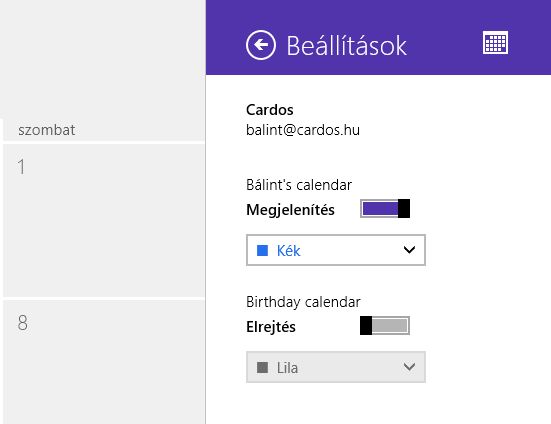
Disable birthday notifications in Windows 8

I think not I’m the one who has 1200′ contacts, and after Microsoft mixed all my Skype, Facebook and MSN contacts’ details, for some reason my Calendar has been flooded with – how to say nicely – not too particularly important individuals’ birthdays. And even worse, it keeps begging for attention by sending 2-3 notifications about these events.

The biggest problem with the new Windows Modern UI is, that it is really ineffective in a way to let the user change the settings. I’m a Windows user since I was 12, but I constantly has to remind myself that each Metro app must have a settings panel somewhere – from the UI perspective alone it is a complete VOID of options – and it is not self explanatory.

tldr; by opening Calendar and going to the Settings charm menu (right side of the screen), from the top the second menu is “Settings” or “Properties” (my guess only - mysteriously this menu shows up as Hungarian on my machine, however I did *not* install any language packs or anything). There you’ll find the Birthday calendar pane, where you can disable this feature.


The Daily SQL Server 2005 Entertainment Column: Reporting Services FAIL

Today is not my day – working with standard database management functions gives me more application errors as if I were typing blindfolded in Visual Studio and pressing F5 :D

Today’s second googlely-clickitry-click-hotfix-install stopper was a lovely error, when I tried to get a Table usage Report from a database:

System.Xml: Object reference not set to an instance of an object.

Nice! Impressive! Informative! :D

Of course it was reported before, and a hotfix is avaliable, so I’m just writing for the magnificent MS mailservers to handle me the download link… well it lasts for 15 minutes now (I’ve checked the spam folder…:) )

The Daily SQL Server 2005 Entertainment Column: Network Backups FAIL

I got a backup of a database from a client, and I wanted to restore over a newly created database. When I selected the file, the Management Studio went berzerk:

Cannot open backup device ‘C:Program FilesMicrosoft SQL ServerMSSQL.1MSSQLBackupbackup.bak’. Operating system error 5(error not found).
RESTORE HEADERONLY is terminating abnormally. (Microsoft SQL Server, Error: 3201)

This is a true WTF heart stopper, I thought that all the backups were invalid since we’re running the site :D

Afterwards it turned out that the client backs up the database files to a networks share, so magically somehow the permissions has been altered for a local restore. According to this hint by Stevied, I added the Network Service user as an owner, and voila: all functionality magically returned… :)

Joomla Search: undefined method SearchHelper::checknohtml()

I’ve recreated a website for my friend using the Joomla portal-framework, the successor of the late Mamboo portal-engine. I personally think it is a bit over-rated, not an easy-to-use system at all.

One huge error I found with the 1.5 install: the search got mixed up somehow, and it failed with the following error message:

Fatal error: Call to undefined method SearchHelper::checknohtml() in /plugins/search/content.php on line 254

..and of course there were no checknohtml() functions in any of the directories.

So i’ve downloaded the last stable version, and found out that originally, this function must live in the ~/administrator/components/com_search/helpers/search.php file. So i’ve just copied over the old file, and voila: it’s working.

Gmail & Windows Mail: “This could, for example indicate a lack of memory on your system”

For some unknown reasons, using Google Mail or Google Mail for your domain with Windows (Live) Mail is a configuration hell. However, as I’m the proud author of ChromeMailer, on some occasions I need to use a real mailer program, for example sending multiple files (which was a true pain in the ass with the web based Gmail since last week), or sending Html mails with inline images.

If you set up your Gmail account according to Gmail Help, it will simply not work, Windows Mail will keep you entertained with silly error messages like  “This could, for example indicate a lack of memory on your system” and other nonsense error messages.

The only working setting is the following:

1) Your IMAP server is imap.googlemail.com not imap.gmail.com (and pop.googlemail.com instead of pop.googlemail.com)

2) Your SMTP server’s port is 587, not 564.

3) Under the IMAP tab, you should uncheck “Store special folders on IMAP server”

Now you can re-sych your accont, and finally you are able to check your emails :)

Change Windows Photo Gallery’s Full Screen Sideshow resolution for Intel GMA

I always missed the “view image in full screen” mode in my Vista installation, because out of the box it does not work with my Intel 950 video chip – when I clicked the Slide Show button it switched video mode back to something below 1024×768 (I’m using a 19″ LCD with 1440×900 resolution), and created a horrible performance and huge artifacts while switching pictures.

After some goggling, I’ve found the Microsoft KB article id #930102, dealing with “choppy image transition” quality. At the end of the article, you can find the solution: hack the registry, and set the WinSATScore to 500, to use the native video resolution. The transitions will be painstakingly slow, but you can press the Pause button to stop it, BUT going back and forth manually does not include transitions! :)

Download remote images with Wget

If you want to get all images (and other fancy stuff like scripts, css) from a website (even if the files referenced in the Html source are hosted on other domains), you can do it with the following wget command:

wget -E -H -k -K -p -U "Mozilla/4.0 (compatible; MSIE 6.0; Windows NT 5.1)"  http://the.domain/file.name

note: if you don’t specify the browser type, the server possibly will think of you as a Crawler, a search engine bot, and will only serve you the robots.txt file.